Peer Editing Observations:
1. Did the editor avoid jump cuts and continuity errors?
2. Do you think the pacing is too slow, just right, or too fast? If you thought it was slow, what specifically needs cutting down?
3. How is the camera composition? Is it too shaky at times? Is the frame filled?
4. Are titles and credits in the video?
5. Does the video fade in and fade out?
6. Is this story interesting and entertaining? Can any quick re-shoots help it out?
7. Is there a six-shot sequence?
Turn in responses at the end of the period.
Monday, October 09, 2006


Tuesday, September 26, 2006
Sequence Editing Assignment
Sequence Assignment
Fade In/Fade Out
Add three transitions between clips.
Add three effects on the different clips.
Add music/or sound effects in two spots.
Add a title at the beginning.
Add credits at the end of the video.
Make sure audio fades in and fades out (adjust levels).
Get creative!!
Fade In/Fade Out
Add three transitions between clips.
Add three effects on the different clips.
Add music/or sound effects in two spots.
Add a title at the beginning.
Add credits at the end of the video.
Make sure audio fades in and fades out (adjust levels).
Get creative!!
Wednesday, September 20, 2006
Video 2 Schedule
9/20 SCNN Prep, Email Teachers, Edit Mockumentary
9/22 Full Period For Mockumentary Shooting
9/25 Raw footage Mockumentary due
9/27 Mockumentary editing
9/29 SCNN shooting all period
10/2 Raw Footage SCNN Due and editing
10/4 SCNN editing
SCNN Commericals due at end of period
Mockumentary editing
10/6 Mockumentary editing
Three-minute movie treatments
10/9 Mockumentary Due
9/20 SCNN Prep, Email Teachers, Edit Mockumentary
9/22 Full Period For Mockumentary Shooting
9/25 Raw footage Mockumentary due
9/27 Mockumentary editing
9/29 SCNN shooting all period
10/2 Raw Footage SCNN Due and editing
10/4 SCNN editing
SCNN Commericals due at end of period
Mockumentary editing
10/6 Mockumentary editing
Three-minute movie treatments
10/9 Mockumentary Due
Tuesday, September 19, 2006
Music Video Assignment
Music Video Assignment
Music Video Project
Video Production
Mr. Mitchell
Requirements:
Students will shoot a music video that is no longer than five minutes.
Music videos must have a concept,theme, or story (not 100% lip-syncing).
Students may work with one other person, but everyone must edit their own version of the video.
Students must turn in a one-page typed treatment.
Most videos have an interesting concept such as a fake TV show, a backwards video, a dance video, a live performance video, or simply an interesting story. Your treatment should explain in detail your concept and how you plan to make this concept come to life. Your treatment should answer the follwing questions:
1. What is your story or concept in great detail? Don't forget costumes, editing and shooting style etc. Your answer should be 4-5 sentences.
2. Who are you working with on this project (inside or outside of class)?
3. When will you shoot?
4. Do you need class time to shoot?
5. What song are you using? How long is the song?
Please email me your responses. Please include Video 1 in the subject line.
Videos must have one at least one eight-shot sequence.
Storyboards of the sequence will be required.
Videos shots must use proper technique discussed in class: good headroom, proper white-balance, leading the subject, focus, and steadiness. Grading of these shots will be more difficult than the last project.
Most shots in music videos are only 1-4 seconds long, please keep this in mind when planning your shots. Plan your shots ahead of time. A three-minute video should have at least 60 shots unless your concept requires something different.
Thursday, September 14, 2006
Monday, September 11, 2006
Video II Outline Assignment
You will write a one to one and a half page outline doubled spaced that describes your mockumentary. This needs to be as detailed as possible. If your Outline is not detailed enough you will need to write a script.
Your names first...
Section I
Describe the two to three main characters. Include ages, habits, goals, ambitions, dress style, dialect, and motivations.
Section II
Describe the plot in detail. What happens in the beginning, middle, and end? Why do the characters act the way they do? What is theit motivation? Are there any twists or surprises? What is the conclusion?
This section should be at least 5-7 sentences long.
Section III
Why do you think this idea will work for a mockumentary? What type of humor will you use (situational, character, slapstick etc.)? Give examples of this humor. Do you need any costumes or props? What kind of music will you use?
When you are done email me your assignment.
In the subject line please put: Video 2 Outline
Your names first...
Section I
Describe the two to three main characters. Include ages, habits, goals, ambitions, dress style, dialect, and motivations.
Section II
Describe the plot in detail. What happens in the beginning, middle, and end? Why do the characters act the way they do? What is theit motivation? Are there any twists or surprises? What is the conclusion?
This section should be at least 5-7 sentences long.
Section III
Why do you think this idea will work for a mockumentary? What type of humor will you use (situational, character, slapstick etc.)? Give examples of this humor. Do you need any costumes or props? What kind of music will you use?
When you are done email me your assignment.
In the subject line please put: Video 2 Outline
Friday, September 08, 2006
This is Spinal Tap
The Video 2 class will be watching one of my favorite movies next week. This Is Spinal Tap is rated R, but I believe the material is OK for most upper classmen in high school. This film is a great example of a "mockumentary" which is the student's first assignment.
"This satire about a fictional heavy metal group named Spinal Tap spoofs nearly every facet of rock 'n' roll -- from vacuous modern songwriting to half-baked album promos to pyrotechnic concerts. Michael McKean, Christopher Guest and Harry Shearer portray the washed-up, aging British rockers whose tresses and egos outstrip their talent. Chronicling the band's evolution and its calamitous comeback tour is filmmaker Marty DiBergi (Rob Reiner)."

Roger Ebert, Chicago Sun-Times
"The satire has a deft, wicked touch." .
James Rocchi, Movie Reviewer
"Mock "rockumentary" is wildly funny and deeply influential."
Common Sense Note
Parents need to know that Spinal Tap is a fictional band, and this humorous “mocumentary” about them highlights their failure. There are moments when the language gets a bit heavy with curse words, but these are short and sporadic.
Parents: Please contact me at trent.mitchell@shorelineschools.org if you have any concerns.
"This satire about a fictional heavy metal group named Spinal Tap spoofs nearly every facet of rock 'n' roll -- from vacuous modern songwriting to half-baked album promos to pyrotechnic concerts. Michael McKean, Christopher Guest and Harry Shearer portray the washed-up, aging British rockers whose tresses and egos outstrip their talent. Chronicling the band's evolution and its calamitous comeback tour is filmmaker Marty DiBergi (Rob Reiner)."
Roger Ebert, Chicago Sun-Times
"The satire has a deft, wicked touch." .
"Mock "rockumentary" is wildly funny and deeply influential."
 | 14+ |
Parents need to know that Spinal Tap is a fictional band, and this humorous “mocumentary” about them highlights their failure. There are moments when the language gets a bit heavy with curse words, but these are short and sporadic.
Parents: Please contact me at trent.mitchell@shorelineschools.org if you have any concerns.
Thursday, September 07, 2006
Video Assignment 1
Video 1 Assigment 1
Camera Skills Assignment 1
Mr Mitchell
Video Production 1
Directions:
1. Make a slate or piece of paper with your name on it and record it at the beginning of your segment.
2. White balance.
3. Zoom in and focus for every shot before you record.
4. Record each shot for 10 seconds. The only thing that should be on your tape is the shot itself, followed by the next shot.
You will be graded on the following criteria:
All shots must be steady, in focus, and correct in composition to receive credit. When you are panning or trucking, remember to us two hands if that helps. Also, for each shot please consider the Rule of Thirds, Framing, Proper Headroom, and Leading the Subject where they apply.
Shots
1. MCU
2. MS
3. LS
4. XLS or establishing shot (no zoom)
5. Truck Right slowly with subject
6. Slow Pan Left to object
7. Slow Tilt up to object
8. POV (set up shot first)
9. Selective Focus with two objects
10. Slow Dolly in from LS to CU of subject
11. Heads in Tails Out
12. OTS
When you are finished with your shots it is your responsibility to get Mr. Mitchell to watch the tape and grade it. Please cue your tape accordingly.
Tuesday, June 20, 2006
Thursday, June 15, 2006
Group Final Video 1 and 2
Group Final
1. I will put you into small groups of 3-4 people.
2. You will decide on a short 2-3 min video to make. You should pick a genre and then come up with a storyline. Something fast paced usually works best.
3. You can do as much pre-production as you would like. This includes script writing, storyboarding, and making and using costumes etc. The video MUST have one 12-shot sequence.
4. You will shoot and edit your video next Monday/Tuesday during class. Basically you have 90 min to shoot and edit your WHOLE video. Dont' forget a title, credits, music, and sound effects. Videos must be exported on the same day.
5. We will watch the videos the last day of class.
Videos will be graded based on entertainment value, editing skill, use of music, and camera work etc. No jump cuts allowed of course!
Tuesday, June 06, 2006
Peer Editing
Documentary Peer Editing
Please answer the following questions on a piece of paper. Discuss your answers with your partner and then turn in this sheet at the end of class.
1. Is there an introduction that explains the documentary subject? Is it effective, why or why not?
2. Are the interview sound bytes kept between eight and fifteen seconds in length? Do the interviews move the story along? Are the interviews free of background noise?
3. Is there narration in the video? If there is no narration, are there titles that further the story? Are either of these an effective way to help tell the story?
4. Is there enough B-roll in the video? Does the B-Roll enhance the story or is it just filler? Could adding any pictures from the Internet help the story?
5. Is the project three-six minutes in length?
6. What music is used? Is there enough variety? Could more music be helpful?
7. Can you hear all of the interviews OK? In other words, are there any TCP errors?
8. Finally, what would you do to improve this video? Give three specific examples.
Please answer the following questions on a piece of paper. Discuss your answers with your partner and then turn in this sheet at the end of class.
1. Is there an introduction that explains the documentary subject? Is it effective, why or why not?
2. Are the interview sound bytes kept between eight and fifteen seconds in length? Do the interviews move the story along? Are the interviews free of background noise?
3. Is there narration in the video? If there is no narration, are there titles that further the story? Are either of these an effective way to help tell the story?
4. Is there enough B-roll in the video? Does the B-Roll enhance the story or is it just filler? Could adding any pictures from the Internet help the story?
5. Is the project three-six minutes in length?
6. What music is used? Is there enough variety? Could more music be helpful?
7. Can you hear all of the interviews OK? In other words, are there any TCP errors?
8. Finally, what would you do to improve this video? Give three specific examples.
Wednesday, May 24, 2006
I am an uncle
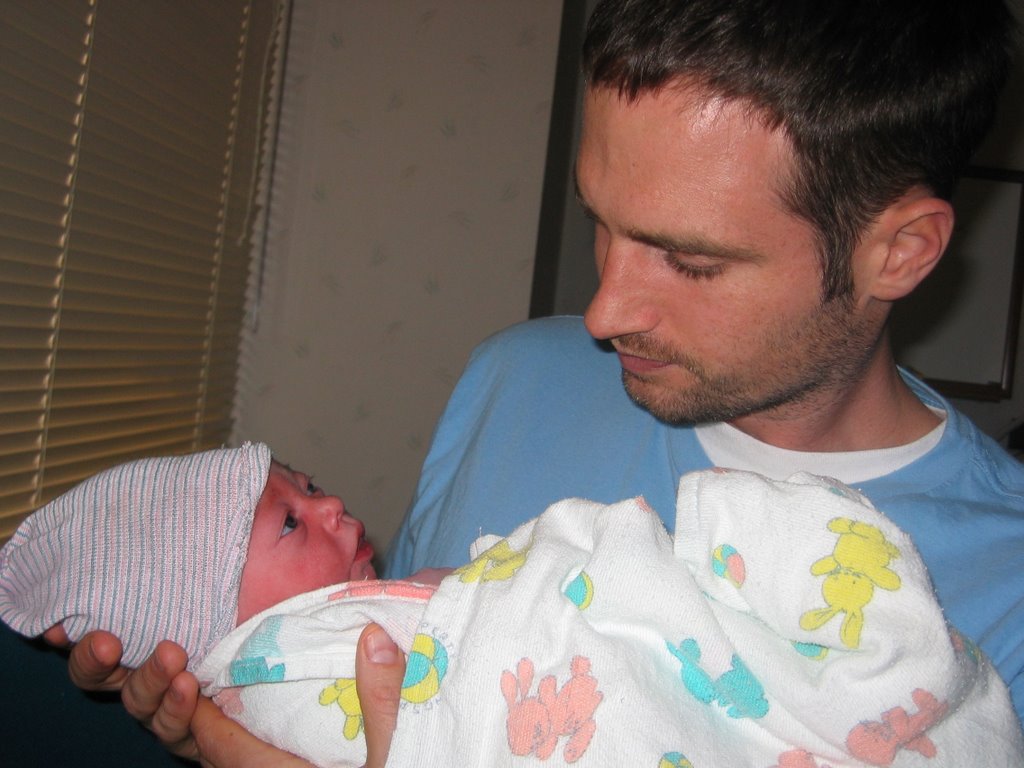
Hi everyone. I am missing class to spend time with my new nephew Dane, who is perhaps the cutest baby of all time.
Please do the following in class today:
Delete extra files from your computer as described below.
Start your creative title sequence for your doc.
When you are done with the title sequence, please put the clips in order and start working on your narration. You can use the back room next to John Wayne to record your narration on tape. Import your narration and then separate the audio from the video in Final Cut by selecting MODIFY>Link.
When I get back next class period I will check on your progress. We will also continue with Riding Giants in Video 1.
Please email me with any questions.
Students to assist with Final Cut:
Period 2-Danny Nguyen
Period 3-Daniel Howes
Period 6-Marek seems to know it the best so far...nice work.
Video Students need to delete files
First, we need to delete excess files off the computers. Please delete anything that is not yours from both the Movies folder and the Final Cut Documents >Capture Scratch Folder (located in Documents). Next, delete all of your projects with the exception of the Quicktime files. Next, empty the trash.
Friday, May 19, 2006
Tuesday, May 16, 2006
Documentary Narration/Text/Organization
Narration Rought Draft
Narration/Organization Rough Draft Assignment
Intro
Three to four sentences describing topic . Give details and history as needed. Feel free to use documented statistics. For example, if you are doing a piece on gas prices then find out how expensive gas has been over the last twenty years. Why the change? What are the factors etc? Do cars get more or less miles per gallon?
Next, list at least five examples of of B-Roll you will use. Again, if you are doing Gas prices you might want to show people filling up at the gas station, a shot or two of gas price signs, people driving cars, and money exchanging hands etc.
Body
Narrate or use text to move from one interview to the next. If you do your interviews well, the interviews will tell the story and your narration will be minimal.
For today’s assignment, pretend you have three different examples and interviews for your topic.
What will you cover in this section? What will the audience learn? Please list the people who have interviewed or will interview and also list the B-Roll that will play underneath those interviews.
Closing
What did you conclude from your documentary (using both sides of course)? You aren't trying to prove a point here as this is more of a recap of what we saw in the body of your documentary.
What should the audience know that ties all the information together? What is next for your subject or subjects?
Your closing narration should be at least three to four sentences.
Monday, May 08, 2006
Documentary Treatment Video 1 and 2
Please answer the following questions in complete sentences on a seperate piece of paper. Print your work neatly please.
1. What is your documentary subject?
2. Why did you choose this subject? Why would this be interesting for us to watch(two-three sentences)
3. What do you think your audience can learn from your documentary? (one-two sentences)
4. What type of B-Roll will your video need (three-four examples)
5. How will you make sure you can cover all sides of this subject? Who will you interview and where will you interview them? (two-three sentences)
6. When do you need a camera? Remember, raw footage is due in two weeks.
When you are finished hand in your paper to Mr. Mitchell. Next, please read Cybercollege 63 and 64. Whatever you do not finish reading from those two chapters is homework tonight.
http://cybercollege.com/tvp063.htm
http://cybercollege.com/interviews.htm
http://cybercollege.com/tvp064.htm
1. What is your documentary subject?
2. Why did you choose this subject? Why would this be interesting for us to watch(two-three sentences)
3. What do you think your audience can learn from your documentary? (one-two sentences)
4. What type of B-Roll will your video need (three-four examples)
5. How will you make sure you can cover all sides of this subject? Who will you interview and where will you interview them? (two-three sentences)
6. When do you need a camera? Remember, raw footage is due in two weeks.
When you are finished hand in your paper to Mr. Mitchell. Next, please read Cybercollege 63 and 64. Whatever you do not finish reading from those two chapters is homework tonight.
http://cybercollege.com/tvp063.htm
http://cybercollege.com/interviews.htm
http://cybercollege.com/tvp064.htm
Tuesday, May 02, 2006
Documentary Requirements
Documentary
Requirements:
3-6 min long
Interviews with good audio
Narration (voice over)
B-Roll video (video shown while we hear interview or narration)
No jump cuts or continuity errors
Documentary will need a full page of interview questions , project goals, and scripted narration.
All projects must use the 30 Degree Rule, rule of thirds, proper headroom, leading the subject, framing, proper white balance, steady camera work, and show strong creativity. Also, please shoot and use many close-up shots, insert shots, and reaction shots as you can.
Due Dates
May 11/12: List of 20 questions and project goals.
May 16/17: Scripted Narration
May 23/24 Raw Footage
June 8/9: Final Video Project
Mr. Mitchell’s 4 Hints to create better documentaries
1. Keep the camera rolling, capture as much footage as possible
2. Research your topic…become an expert
3. Come prepared at interviews with a list of questions
4. Avoid bias in your story. Tell the facts and avoid taking sides.
Requirements:
3-6 min long
Interviews with good audio
Narration (voice over)
B-Roll video (video shown while we hear interview or narration)
No jump cuts or continuity errors
Documentary will need a full page of interview questions , project goals, and scripted narration.
All projects must use the 30 Degree Rule, rule of thirds, proper headroom, leading the subject, framing, proper white balance, steady camera work, and show strong creativity. Also, please shoot and use many close-up shots, insert shots, and reaction shots as you can.
Due Dates
May 11/12: List of 20 questions and project goals.
May 16/17: Scripted Narration
May 23/24 Raw Footage
June 8/9: Final Video Project
Mr. Mitchell’s 4 Hints to create better documentaries
1. Keep the camera rolling, capture as much footage as possible
2. Research your topic…become an expert
3. Come prepared at interviews with a list of questions
4. Avoid bias in your story. Tell the facts and avoid taking sides.
Exporting From Final Cut to Quicktime
File>Export>Quicktime Movie>
Save the video as "your name_Subject_ commercial" and save it in the movies folder.
Next, control-click on the file in your movies folder and select g'et info'. Please make sure that everything under details and ownerships and permissions is set to 'read-write'.
Save the video as "your name_Subject_ commercial" and save it in the movies folder.
Next, control-click on the file in your movies folder and select g'et info'. Please make sure that everything under details and ownerships and permissions is set to 'read-write'.
Subscribe to:
Posts (Atom)